 Platform
  Hire
Hire  Schedule
  Pay
Pay  Develop
  Plan
Plan  By industry
  By role
  By use case
  Customer Success
  Implementation
  Training & Development
  Partner Program
  Partner Finder
  Partner Stories
  Flare Employee Benefits
 Our supportive Implementation Service
We support you at every stage of implementing your new ELMO solution. From the initial kick-off meeting to go-live and beyond, our priority is to ensure that the implementation and configuration of your ELMO system is collaborative, well-structured, supportive, seamless and effective.
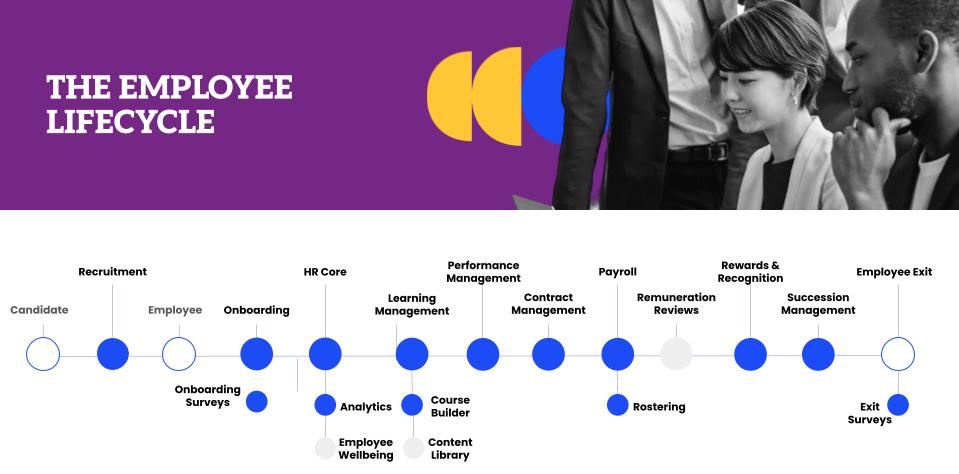
ELMO provides comprehensive support throughout your implementation journey:
- Swift Setup: Within 48 hours, we create your branded site, grant access, and enrol your team in ELMO Academy.
- Expert Guidance: An ELMO consultant assists with foundational setup, ensuring configuration meets your specific needs.
- Flexible Approaches: Choose between Best Practice (4-6 weeks) or Tailored (8-12 weeks) implementation, based on your needs and timeline.
- Continuous Support: From Kick-off to Go-live and beyond, we ensure a collaborative, structured, and effective implementation process.
- On-Screen Assistance: Easy-to-follow instructions and tutorials guide you through each step.
Once you have access to your ELMO system, one of our expert consultants will reach out within a few days to personally assist you with the foundational setup and ensure everything is configured to your specific needs:
Foundational Setup
Activate
- Essential base configuration
- Estimated timeframe: 4 weeks
- Estimated hours: 8 hours
The whole system utilises this foundational configuration and ties all the modules together.
You will then follow one of two approaches to implement your HR & Payroll Modules:
Our 6 to 8-week implementation journey isn’t just a process;
it’s your passport to HR & Payroll excellence.
HR Module Implementation Approach
Average HR Module Implementation Journey
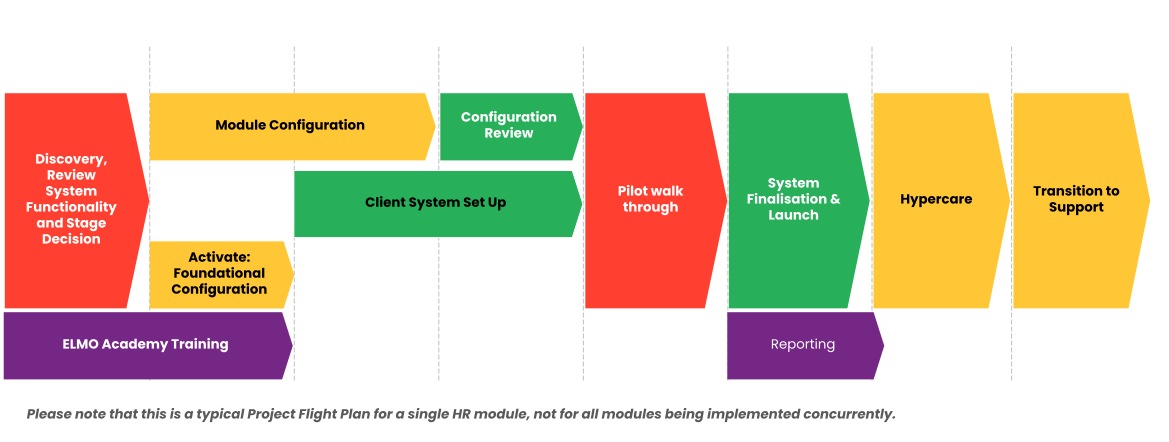
Implementation Methodology: Shared Responsibility
| Activities | Hours | Milestone | |
| Weeks 1-4: Collaborative Preparation |
Joint effort: Discovery session |
2-3 | Baseline configuration ready for pilot testing |
| Your team: Complete eTraining |
6-8 | ||
| ELMO: System configuration |
5-10 | ||
| Your team: Configuration review |
4-8 | ||
| Weeks 4-6: Testing and Launch Preparation |
Your team: Conduct pilot tests |
10-20 | Refined configuration incorporating pilot feedback |
| Joint effort: System finalisation |
10-15 | ||
| Week 6: Launch |
Your team: System / Module launch |
10-15 | Active system with users |
| Weeks 6-8: Hypercare |
Joint effort: Support launched modules |
10-15 | Transition to our ongoing support model |
| Week 8 | ELMO: Transition to Support |
1 | Your ongoing support |
Note: Timelines may vary based on project scope and complexity
Payroll Implementation Approach
ELMO Payroll implementation is carefully designed to support your business needs, ensuring a smooth and reliable integration that adapts as your organisation grows.
Average Payroll Module Implementation Journey
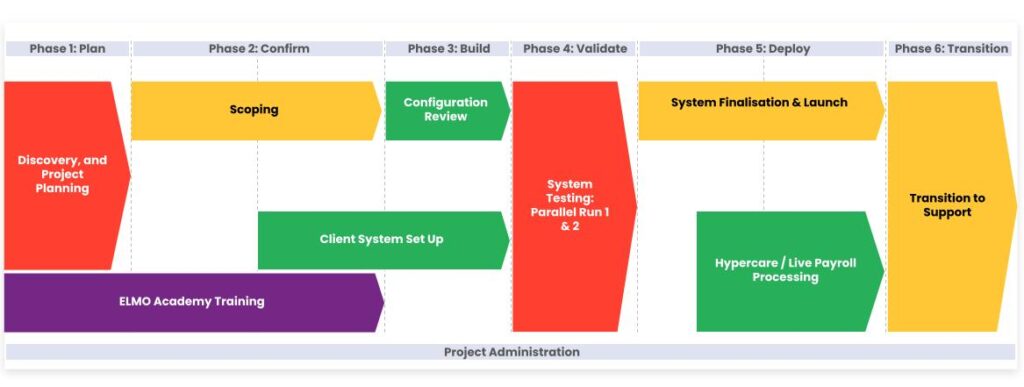
Payroll Implementation Timeline
Implementation Methodology: Shared Responsibility
Estimated Duration: 14-26 weeks
Recommended Start: Initiate Payroll implementation following successful deployment of HR Core modules
Payroll Implementation Phases
| Activities | Estimated Effort (hours) | Milestone | |
| Phase 1: Plan Week 1 |
Joint effort:
|
4 |
|
| Your team: Complete eTraining |
4 | ||
| Phase 2: Confirm Weeks 2-3 |
ELMO:
|
4 |
|
Your team:
|
11-16 | ||
| Phase 3: Build Weeks 4-7 |
ELMO:
|
4 |
|
Joint effort:
|
11-16 | ||
| Phase 4: Validate Weeks 8-11 |
ELMO:
|
10-15 |
|
Your team:
|
15-25 | ||
| Phase 5: Deploy Weeks 12-13 |
Joint effort:
|
10-15 |
|
| Phase 5: Transition Weeks 14-16 |
Joint effort:
|
5-8 |
|
ELMO:
|
2 |
Note: The Payroll Implementation Phases provided above is an example only. Timelines will vary based on product, project scope, and complexity.
Launch Strategies: Your Choice
- Big Bang Approach
- Launch all modules simultaneously
- Staged Approach
- Roll out modules individually upon completion
- Blended
- Launch some modules concurrently, and some sequentially